Windows MSI creation, wherever you build.

Turn your application files into a proper Windows Installer package from Windows, Linux, or macOS—without adopting a sprawling packaging toolchain.

  • Build on any major desktop platform
  • Start from your application files
  • Pay once and keep every feature
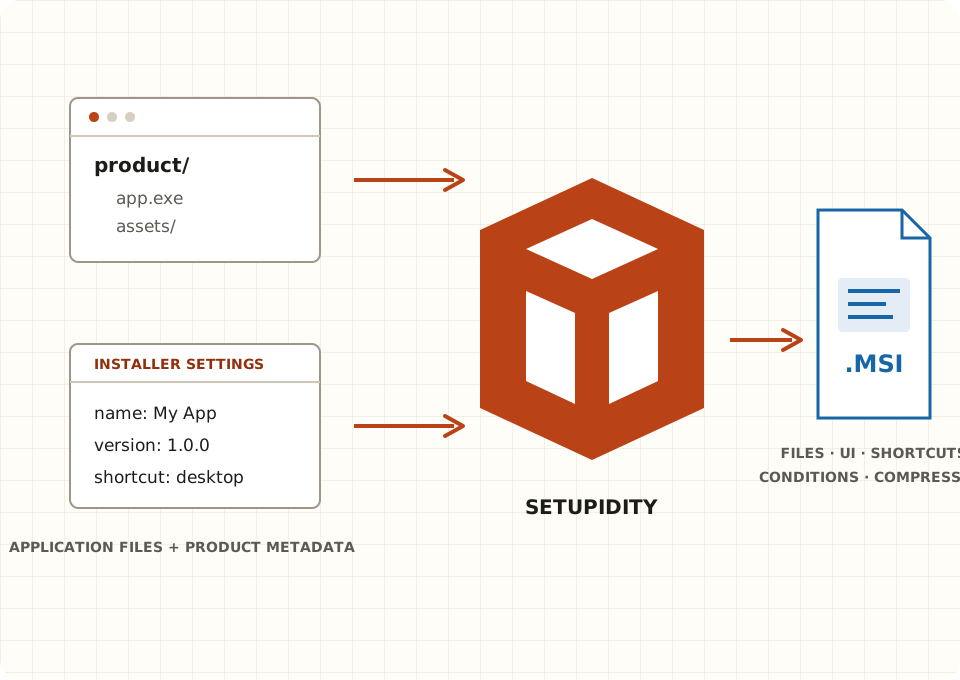
Application files and installer settings pass through Setupidity to create a Windows MSI with files, UI, shortcuts, conditions, and compression.
3 authoring platformsWindows · Linux · macOS
One focused commandFiles and metadata in · MSI out
$49 or $99 onceEvery feature · No renewals

From application files to an MSI in one command

Point Setupidity at your application directory, add clear product metadata, and choose the installer features you need. The output is a standard .msi ready for signing, testing, and distribution.

PowerShellfirst package
setupidity build `
  --id com.example.myapp `
  --name "My App" `
  --version 1.0.0 `
  --publisher "Example Co" `
  --payload ./app `
  --output ./dist/my-app.msi
✓Created my-app.msiApplication files included and ready to test
01Choose your application folder
02Add product identity and options
03Build the MSI

Why Setupidity

Packaging without the packaging project.

01

Build where your code already builds

Keep Windows packaging in the same local or automated workflow you use for the rest of your product. Setupidity builds run on Windows, Linux, and macOS, so an MSI does not require a dedicated Windows authoring machine.

WINLNXMAC
02

Start small. Add what the installer needs.

Begin with a payload directory and product identity. Add install-directory selection, license acceptance, shortcuts, icons, launch conditions, custom folders, and compression deliberately—not as project boilerplate.

03

Buy once and stop counting

Both licenses contain every product feature and every future update released while Setupidity continues to be developed. There are no subscriptions, renewals, feature tiers, device limits, or build-agent fees.

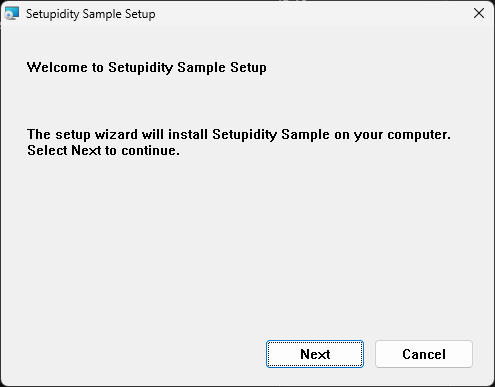
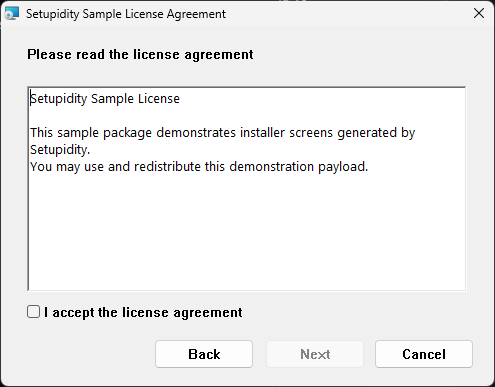
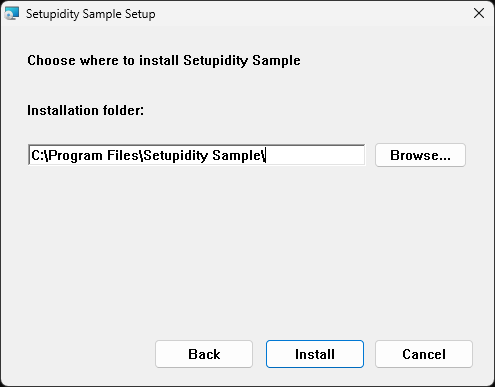
Setupidity Sample welcome page introducing the guided installation. License acceptance page with sample terms and a checkbox required to continue. Destination selection page with an installation folder, Browse button, and Install button.
Windows Installer screens generated by Setupidity from the sample package, captured on Windows 11.

Produce an installer that feels complete

Create a familiar guided install experience, or keep the package minimal. Add a modern installer theme, destination-folder selection, a required license page, Start menu and desktop shortcuts, custom folder trees, application icons, and conditions that stop an unsupported installation with a useful message.

Less machinery between your files and the MSI

Setupidity is for teams that want a focused command-line authoring path rather than a large visual packaging suite or a broad XML-based toolchain. The product surface stays close to the result: metadata, application files, installer behavior, and one output package.

Buyer concernSetupidity approachPractical result
Authoring platformWindows, Linux, or macOSKeep packaging beside your existing build
Starting pointApplication folder plus product metadataCreate a useful package before adding extras
AutomationThe same CLI locally and in CINo separate build-agent product or fee
Licensing$49 Individual or $99 Business, onceNo seats, renewals, or feature tiers

Benchmark recorded 20 September 2026 on Windows with 20 measured runs after three warmups. Results vary by project and machine. Explore the comparison.

One product. Two license owners.

Choose who owns the license: you, or your organization. Both choices are a single payment, include the same complete product, and allow royalty-free distribution of every installer you create.

Owned by you

Individual

$49 one time, plus applicable tax.

For one person, including commercial and freelance work. Use Setupidity on all your computers and personal build agents. The license stays with you.

  • Commercial and freelance use
  • All personal devices and build agents
  • Every feature and future update
Choose Individual

Both licenses include perpetual use, royalty-free installer distribution, and all updates released while Setupidity continues to be developed. See full license details.

Your application is ready. Package it properly.

Start with the documentation, check the supported installer features, or choose the perpetual license that fits who will own Setupidity.